
GPS Car Tracker1.1 - Get APK
You'll be able to download in few seconds.
Publisher Description
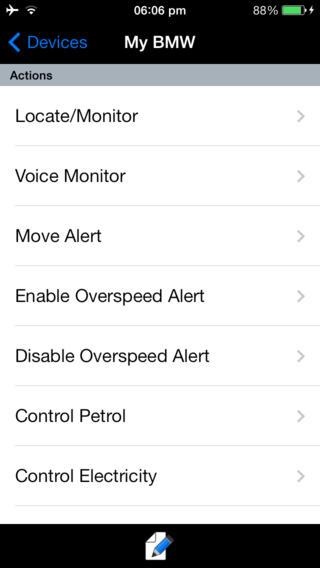
Fimto GPS Car Tracker is an easy & friendly application to manage & configure your Cars' GPS trackers all at one glance..
Don't bother yourself remembering Tracker's SMS commands' formats anymore.
Description
Fimto GPS Car Tracker is an easy & friendly application to manage & configure your Cars' GPS trackers all at one glance..
Don't bother yourself remembering Tracker's SMS commands' formats anymore.
Application Features :
* Configure & Reset device
* Manage your tracker's Alerts by Enable,Disable or Configure your Alerts.
* Configure tracker with our website platform : www.fimto.com to be able to view all your cars/tracker devices online using different kind of detailed maps.
** Functions ** :
-> Arm / Disarm - unit will send an SMS if moved
-> Locate - ask the unit its current location (latitude/longitude)
-> Map - map the unit's location from the response
-> Auto Track - reports unit's position every X minutes (configurable)
-> Speed Alert - report when set speed limit is exceeded.
-> Geo-Fence - report when the unit leaves or enters a defined boundary
-> Monitor - listen to the unit's microphone
-> Config - add and remove authorized numbers, change the unit's password
-> Multiple Device Support - track several GPS trackers at same time.
Ideal for protecting your child, elderly relative, car, boat, caravan, bike or pet.
* This app requires a TK102, TK103, TK104, TK105, TK106 or TK201 GPS tracker device. These are inexpensive and can be bought from popular internet sites like Amazon,ebay,etc...or any other local distributor.The TK102 is a personal device, others are designed for use in vehicles. TK 103 & TK 106 has been tested,Other TK GPS units are usually compatible but have not been tested yet.
This communicates with the device via SMS. Apps are not permitted to read SMS messages.
We have same version for iPhone applications as well through App store
Problems?
Email us:> info@fimto.com
Keywords: Fimto , GPS . Car , Tracker , Thief , attacking , monitor , family , safety
About GPS Car Tracker
The company that develops GPS Car Tracker is Fimto ®. The latest version released by its developer is 1.1.
To install GPS Car Tracker on your Android device, just click the green Continue To App button above to start the installation process. The app is listed on our website since 2014-12-04 and was downloaded 0 times. We have already checked if the download link is safe, however for your own protection we recommend that you scan the downloaded app with your antivirus. Your antivirus may detect the GPS Car Tracker as malware as malware if the download link to fimto.apps.android is broken.
How to install GPS Car Tracker on your Android device:
- Click on the Continue To App button on our website. This will redirect you to Google Play.
- Once the GPS Car Tracker is shown in the Google Play listing of your Android device, you can start its download and installation. Tap on the Install button located below the search bar and to the right of the app icon.
- A pop-up window with the permissions required by GPS Car Tracker will be shown. Click on Accept to continue the process.
- GPS Car Tracker will be downloaded onto your device, displaying a progress. Once the download completes, the installation will start and you'll get a notification after the installation is finished.
Version History
version 1.1
posted on 2014-12-04
Disclaimer
External Download
We do not host GPS Car Tracker on our servers. We did not scan it for viruses, adware, spyware or other type of malware. This app is hosted by Galad and passed their terms and conditions to be listed there. We recommend caution when installing it.
The APK Download link for GPS Car Tracker is provided to you by apps112.com without any warranties, representations or guarantees of any kind, so access it at your own risk.
If you have questions regarding this particular app contact the publisher directly. For questions about the functionalities of apps112.com contact us.
